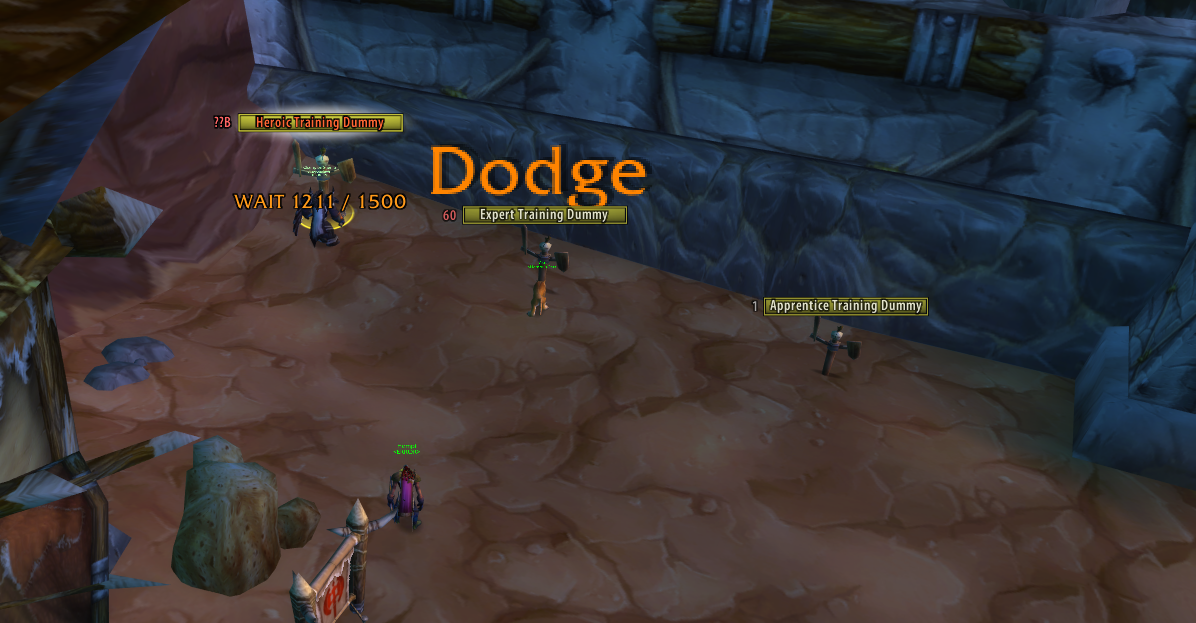
 *A listed tank hitting the training dummies in Orgrimmar, seen from another character: an orange melee
"Miss", a gold spell "Resist", and the experimental WAIT label under the dummy being attacked.*
## What's new — 0.3.1 · 2026-10-15
- **The line tower no longer overlaps.** Every line reserves its real height, including the crit size pop
and the spell / name line under it, and crits now rise with the rest of the stack, so newer lines can
not run into them.
- **Crits of tiny procs pop smaller** (a crit "3" among Fire Strike ticks is half size), measured against
the source's average hit.
## What's new — 0.3.0 · 2026-10-15
- **Identical hits are merged.** Fire Strike style tick storms become one line with the running sum
(same source, victim, ability and hit/crit within 0.4 s; the number updates in place, words are not
summed). Switch off or tune under Text: *Merge identical hits*, *Merge window*, *Show hit count*.
- **Placement "Nameplate + anchor"** shows every line, and the GO / WAIT label, over the plate and at the
fixed anchor at once, with separate line limits.
- **The Demo previews your own setup**: a 2.5 s burst of your first targetSCT's class skills (Stormstrike,
Earth Shock and friends for a shaman) with all your display settings, plus the GO / WAIT label inside
the anchor box, to judge the line tower without a second character.
- **Fixed: the anchor no longer jumps when you drop it.** The dropped position is now exact, and the
Anchor X / Y sliders cover the whole screen.
## What's new — 0.2.0 · 2026-10-15
- **targetSCT.** What used to be called "tank" is now *targetSCT* everywhere (menu, options, commands
keep working). Each targetSCT can show its **name** next to its numbers (Never / only with several /
always) and gets its **own colour**, picked automatically so they are easy to tell apart.
- **Every hit is shown.** The default limits are 16 lines per mob and 60 on screen, so a burst of about
ten hits per second is no longer recycled.
- **nampower spell events are used on every nampower build**: builds that deliver spell damage and miss
events without the `NP_Enable...` CVars were treated as "no events" and fell back to chat rows.
- **Regrouped options with tooltips on every label**, four tabs: targetSCTs, Text, Colours, Placement.
The window now sits above world nameplates.
- **Experimental GO / WAIT label** over your own elite target: how much threat lead the targetSCT has
over you, from the server's threat data (needs a group; see [GO / WAIT](#go--wait-threat-label-experimental)).
**Version history** — details in [CHANGELOG.md](CHANGELOG.md):
- **0.3.1** (2026-10-15) — fix: the line tower no longer overlaps (real line heights, crits rise with the
stack), crits of tiny procs pop smaller.
- **0.3.0** (2026-10-15) — merged identical hits, "Nameplate + anchor" placement, a demo that plays your own
targetSCT's class burst and previews GO / WAIT, anchor drop fix.
- **0.2.0** (2026-10-15) — targetSCT rename, name option, per-targetSCT colours, regrouped options with
label tooltips, higher line limits, experimental threat-based GO / WAIT.
- **0.1.0** (2026-10-14) — first release: list, victim-routed text in the client's own style, nameplate
placement, heals, options and minimap button.
## What you see
Everything floats over the **victim** of the event, never over the source:
- **Melee in orange, special attacks in gold, heals in green.** Numbers use the client's own damage font,
no outline, a black shadow. Ordinary hits rise and fade; **crits pop** at a larger size and rise with the stack.
- **Words for what did not land**: Miss, Dodge, Parry, Block, Resist, Immune, ... in the same style.
- **Every hit is shown**: up to 16 lines per mob and 60 on screen by default, so a fast burst is not
recycled early (both are sliders on the Text tab).
- **Identical hits are merged**: the same attack from the same source on the same mob within 0.4 s shows
as one line with the summed value (tiny procs like Fire Strike no longer flood the tower; Text tab).
- Pets and totems of a listed unit are shown under their owner; Fire Nova, traps and other area damage
land on the mob they hit.
*A listed tank hitting the training dummies in Orgrimmar, seen from another character: an orange melee
"Miss", a gold spell "Resist", and the experimental WAIT label under the dummy being attacked.*
## What's new — 0.3.1 · 2026-10-15
- **The line tower no longer overlaps.** Every line reserves its real height, including the crit size pop
and the spell / name line under it, and crits now rise with the rest of the stack, so newer lines can
not run into them.
- **Crits of tiny procs pop smaller** (a crit "3" among Fire Strike ticks is half size), measured against
the source's average hit.
## What's new — 0.3.0 · 2026-10-15
- **Identical hits are merged.** Fire Strike style tick storms become one line with the running sum
(same source, victim, ability and hit/crit within 0.4 s; the number updates in place, words are not
summed). Switch off or tune under Text: *Merge identical hits*, *Merge window*, *Show hit count*.
- **Placement "Nameplate + anchor"** shows every line, and the GO / WAIT label, over the plate and at the
fixed anchor at once, with separate line limits.
- **The Demo previews your own setup**: a 2.5 s burst of your first targetSCT's class skills (Stormstrike,
Earth Shock and friends for a shaman) with all your display settings, plus the GO / WAIT label inside
the anchor box, to judge the line tower without a second character.
- **Fixed: the anchor no longer jumps when you drop it.** The dropped position is now exact, and the
Anchor X / Y sliders cover the whole screen.
## What's new — 0.2.0 · 2026-10-15
- **targetSCT.** What used to be called "tank" is now *targetSCT* everywhere (menu, options, commands
keep working). Each targetSCT can show its **name** next to its numbers (Never / only with several /
always) and gets its **own colour**, picked automatically so they are easy to tell apart.
- **Every hit is shown.** The default limits are 16 lines per mob and 60 on screen, so a burst of about
ten hits per second is no longer recycled.
- **nampower spell events are used on every nampower build**: builds that deliver spell damage and miss
events without the `NP_Enable...` CVars were treated as "no events" and fell back to chat rows.
- **Regrouped options with tooltips on every label**, four tabs: targetSCTs, Text, Colours, Placement.
The window now sits above world nameplates.
- **Experimental GO / WAIT label** over your own elite target: how much threat lead the targetSCT has
over you, from the server's threat data (needs a group; see [GO / WAIT](#go--wait-threat-label-experimental)).
**Version history** — details in [CHANGELOG.md](CHANGELOG.md):
- **0.3.1** (2026-10-15) — fix: the line tower no longer overlaps (real line heights, crits rise with the
stack), crits of tiny procs pop smaller.
- **0.3.0** (2026-10-15) — merged identical hits, "Nameplate + anchor" placement, a demo that plays your own
targetSCT's class burst and previews GO / WAIT, anchor drop fix.
- **0.2.0** (2026-10-15) — targetSCT rename, name option, per-targetSCT colours, regrouped options with
label tooltips, higher line limits, experimental threat-based GO / WAIT.
- **0.1.0** (2026-10-14) — first release: list, victim-routed text in the client's own style, nameplate
placement, heals, options and minimap button.
## What you see
Everything floats over the **victim** of the event, never over the source:
- **Melee in orange, special attacks in gold, heals in green.** Numbers use the client's own damage font,
no outline, a black shadow. Ordinary hits rise and fade; **crits pop** at a larger size and rise with the stack.
- **Words for what did not land**: Miss, Dodge, Parry, Block, Resist, Immune, ... in the same style.
- **Every hit is shown**: up to 16 lines per mob and 60 on screen by default, so a fast burst is not
recycled early (both are sliders on the Text tab).
- **Identical hits are merged**: the same attack from the same source on the same mob within 0.4 s shows
as one line with the summed value (tiny procs like Fire Strike no longer flood the tower; Text tab).
- Pets and totems of a listed unit are shown under their owner; Fire Nova, traps and other area damage
land on the mob they hit.
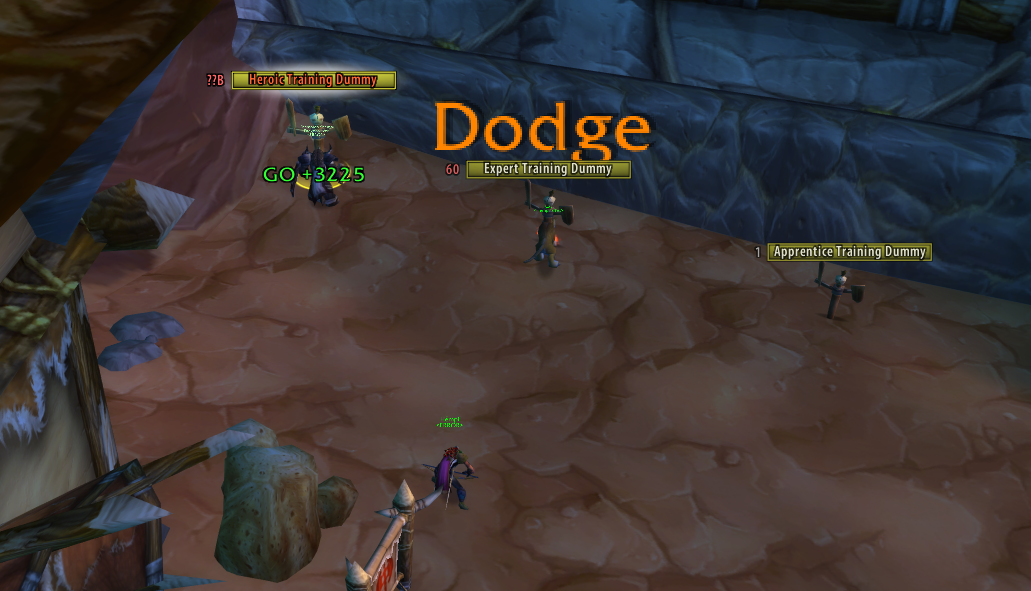
 *A crit "366" popping over the Heroic Training Dummy, a "Block" in grey, and a GO label partly covered by
the crit.*
*A crit "366" popping over the Heroic Training Dummy, a "Block" in grey, and a GO label partly covered by
the crit.*
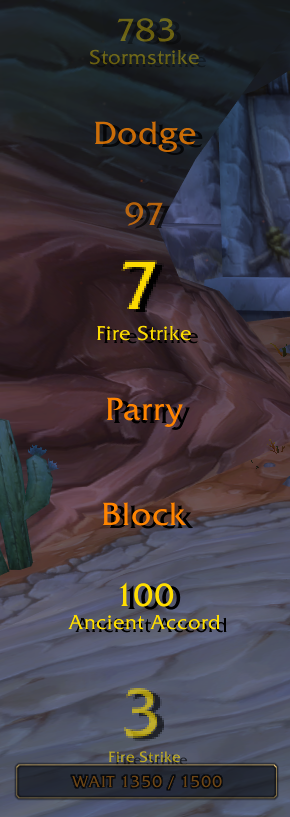
WAIT at the anchor — the Demo's shaman burst, no overlaps: a faded 783 Stormstrike on top, Dodge, 97, a merged 7 Fire Strike, Parry, Block, 100 Ancient Accord, a half-size crit 3 Fire Strike, and "WAIT 1350 / 1500" inside the anchor box

GO at the anchor — later in the burst: a fading Ancient Accord, 3 Fire Strike, Resist, 7 Fire Strike, a big crit 216, 194, a crit 760 Earth Shock, and "GO +1875" inside the box
 *General, What to show and the GO / WAIT section on the left; the targetSCT list with a colour swatch and a
Threat switch per row, the list buttons and the main-tank import on the right.*
| control | what it does | default |
|---|---|---|
| Enable AnySCT | master switch | on |
| Only while the targetSCT fights | hide text while the listed unit itself is not in combat (shown if its state cannot be read) | off |
| Extend combat log range (200) | sets the combat-log range CVars to 200 on login so raid targetSCTs outside your party are not silent | on |
| Show minimap button | left click unlocks / locks the anchor, right click opens the options | on |
| Show special attacks | also show Heroic Strike, Stormstrike and other ability rows (gold) | on |
| Include totems | show totem damage whose owner is a listed targetSCT | on |
| Guess totem owner | when no owner is known, assume the only listed shaman; can misattribute | off |
| Show heals on targetSCTs | heals received by a listed unit float over it as green `+amount` | on |
| Show HoT ticks | also heal-over-time ticks (chat rows only, can be busy) | off |
| Include my own heals | your own heals on listed units too | on |
| Enable GO / WAIT (experimental) | the threat label described above | off |
| Required threat buffer | slider 0-7500 in steps of 100 | 1500 |
| targetSCT list | one row per unit: colour swatch (click to pick), **Threat** switch (does the unit feed the GO / WAIT label); click a row to select it | empty |
| Add / Remove / Clear | add the typed name (empty box: your target), remove the selected row, empty the list | |
| Auto colours | give every unit a new automatic colour; replaces hand-picked colours | |
| Import CT_RA / oRA main tanks | add the main tanks of those addons that are in your group | on |
### Tab 2 — Text
*General, What to show and the GO / WAIT section on the left; the targetSCT list with a colour swatch and a
Threat switch per row, the list buttons and the main-tank import on the right.*
| control | what it does | default |
|---|---|---|
| Enable AnySCT | master switch | on |
| Only while the targetSCT fights | hide text while the listed unit itself is not in combat (shown if its state cannot be read) | off |
| Extend combat log range (200) | sets the combat-log range CVars to 200 on login so raid targetSCTs outside your party are not silent | on |
| Show minimap button | left click unlocks / locks the anchor, right click opens the options | on |
| Show special attacks | also show Heroic Strike, Stormstrike and other ability rows (gold) | on |
| Include totems | show totem damage whose owner is a listed targetSCT | on |
| Guess totem owner | when no owner is known, assume the only listed shaman; can misattribute | off |
| Show heals on targetSCTs | heals received by a listed unit float over it as green `+amount` | on |
| Show HoT ticks | also heal-over-time ticks (chat rows only, can be busy) | off |
| Include my own heals | your own heals on listed units too | on |
| Enable GO / WAIT (experimental) | the threat label described above | off |
| Required threat buffer | slider 0-7500 in steps of 100 | 1500 |
| targetSCT list | one row per unit: colour swatch (click to pick), **Threat** switch (does the unit feed the GO / WAIT label); click a row to select it | empty |
| Add / Remove / Clear | add the typed name (empty box: your target), remove the selected row, empty the list | |
| Auto colours | give every unit a new automatic colour; replaces hand-picked colours | |
| Import CT_RA / oRA main tanks | add the main tanks of those addons that are in your group | on |
### Tab 2 — Text
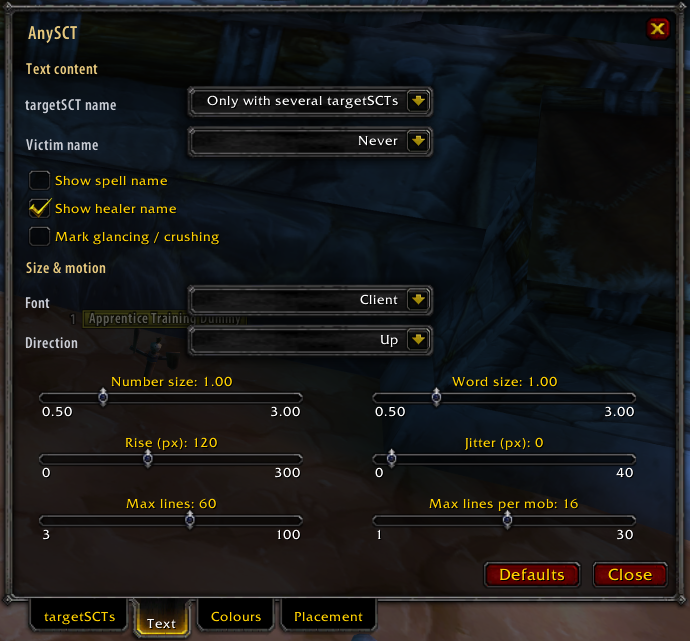 *Text content (name modes, spell name, healer name, glancing marks) above, Size & motion (font, direction and
six sliders including the line limits) below.*
| control | what it does | default |
|---|---|---|
| targetSCT name | the source's name (the owner's for pets and totems) first on the line under the number: Never / Only with several targetSCTs / Always | Only with several |
| Victim name | the victim's name under the text: Never / Anchor only / Always | Never |
| Show spell name | ability name under the number for special attacks | off |
| Show healer name | healer's name under heal numbers | on |
| Mark glancing / crushing | add the word after the number | off |
| Merge identical hits | identical attacks (same source, victim, ability; normal hit or crit) within the merge window become one line with the running sum, updated in place; words are not summed | on |
| Show hit count | append the number of merged hits, e.g. `12 x5` | off |
| Merge window | seconds a line keeps absorbing identical hits, counted from its first hit (0.1-1.5) | 0.4 |
| Font | Client (the damage font, honours pfUI) / FrizQT / Skurri / Arial Narrow | Client |
| Direction | text rises (Up) or sinks (Down) | Up |
| Number size | factor on the engine size, 0.5-3 | 1.00 |
| Word size | same for Miss / Dodge / Parry ... | 1.00 |
| Rise (px) | how far a normal text rises, 0-300; crits rise with the stack | 120 |
| Jitter (px) | random horizontal offset per line, 0-40 | 0 |
| Max lines | lines on screen over all mobs, 3-100; the oldest is recycled at the limit | 60 |
| Max lines per mob | lines over one mob, 1-30; lines live 1.5 s, so 16 shows every hit of a burst of about 10 per second | 16 |
### Tab 3 — Colours
*Text content (name modes, spell name, healer name, glancing marks) above, Size & motion (font, direction and
six sliders including the line limits) below.*
| control | what it does | default |
|---|---|---|
| targetSCT name | the source's name (the owner's for pets and totems) first on the line under the number: Never / Only with several targetSCTs / Always | Only with several |
| Victim name | the victim's name under the text: Never / Anchor only / Always | Never |
| Show spell name | ability name under the number for special attacks | off |
| Show healer name | healer's name under heal numbers | on |
| Mark glancing / crushing | add the word after the number | off |
| Merge identical hits | identical attacks (same source, victim, ability; normal hit or crit) within the merge window become one line with the running sum, updated in place; words are not summed | on |
| Show hit count | append the number of merged hits, e.g. `12 x5` | off |
| Merge window | seconds a line keeps absorbing identical hits, counted from its first hit (0.1-1.5) | 0.4 |
| Font | Client (the damage font, honours pfUI) / FrizQT / Skurri / Arial Narrow | Client |
| Direction | text rises (Up) or sinks (Down) | Up |
| Number size | factor on the engine size, 0.5-3 | 1.00 |
| Word size | same for Miss / Dodge / Parry ... | 1.00 |
| Rise (px) | how far a normal text rises, 0-300; crits rise with the stack | 120 |
| Jitter (px) | random horizontal offset per line, 0-40 | 0 |
| Max lines | lines on screen over all mobs, 3-100; the oldest is recycled at the limit | 60 |
| Max lines per mob | lines over one mob, 1-30; lines live 1.5 s, so 16 shows every hit of a burst of about 10 per second | 16 |
### Tab 3 — Colours
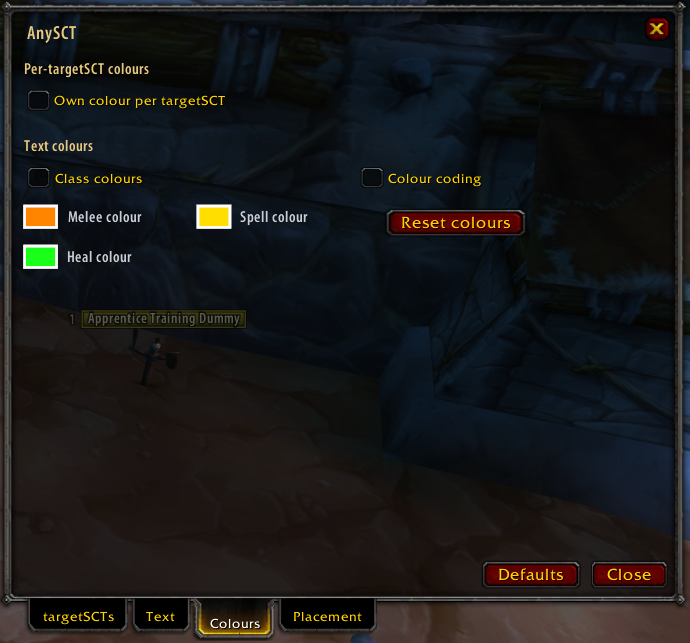 *Per-targetSCT colours, the text colour switches, and the three colour swatches with Reset colours.*
| control | what it does | default |
|---|---|---|
| Own colour per targetSCT | every listed unit gets its own colour (pets and totems use the owner's) | off |
| Class colours | numbers and words take the source's class colour | off |
| Colour coding | crit yellow, miss / dodge / parry red, block blue, absorb / resist / immune purple; off: everything orange | off |
| Melee colour | colour picker with live preview | orange `FF8400` |
| Spell colour | colour of special attacks | gold `FFDE00` |
| Heal colour | colour of heal numbers | green |
| Reset colours | back to the three defaults | |
Precedence: heal colour, then the unit's own colour, then class colour, colour coding and the melee / spell
colours. The colour picker opens in front of the options window.
### Tab 4 — Placement
*Per-targetSCT colours, the text colour switches, and the three colour swatches with Reset colours.*
| control | what it does | default |
|---|---|---|
| Own colour per targetSCT | every listed unit gets its own colour (pets and totems use the owner's) | off |
| Class colours | numbers and words take the source's class colour | off |
| Colour coding | crit yellow, miss / dodge / parry red, block blue, absorb / resist / immune purple; off: everything orange | off |
| Melee colour | colour picker with live preview | orange `FF8400` |
| Spell colour | colour of special attacks | gold `FFDE00` |
| Heal colour | colour of heal numbers | green |
| Reset colours | back to the three defaults | |
Precedence: heal colour, then the unit's own colour, then class colour, colour coding and the melee / spell
colours. The colour picker opens in front of the options window.
### Tab 4 — Placement
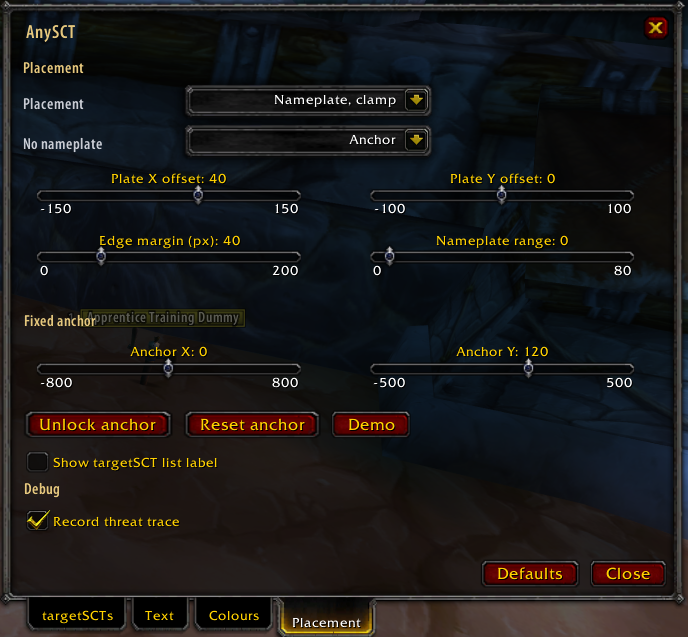 *Placement and no-nameplate behaviour, plate offsets and range, the fixed anchor with Unlock / Reset / Demo, the
list label, and the Debug section.*
| control | what it does | default |
|---|---|---|
| Placement | Nameplate, clamp (over the victim's plate, held at the screen edge) / Nameplate, else anchor / Always anchor / Nameplate + anchor (both at once, separate line limits) | Nameplate, clamp |
| No nameplate | when the victim has no visible plate: Anchor / Hide | Anchor |
| Plate X offset | horizontal shift from the plate centre, -150..150 | 40 |
| Plate Y offset | vertical shift from the plate's top edge, -100..100 | 0 |
| Edge margin (px) | distance to the screen edge at which a plate counts as off screen, 0-200 | 40 |
| Nameplate range | sets the nameplate range CVars on login (SuperWoW / nampower), 0-80; 0 leaves them alone | 0 |
| Anchor X / Anchor Y | position of the fixed anchor from the screen centre, -800..800 / -500..500 | 0 / 120 |
| Unlock anchor / Lock anchor | drag the anchor box; a demo stream plays while unlocked | |
| Reset anchor | back to screen centre, 120 px up | |
| Demo | starts at once with a 2.5 s burst of your first targetSCT's class skills (a shaman demo tank without one) on one victim, using all your display settings (Stormstrike, Earth Shock, tiny Fire Strike ticks, melee, crits, extra attacks, and every result type: crit, miss, dodge, parry, block, resist) that fills the per-mob line tower, plus a simulated GO / WAIT threat label (works with Threat GO off); at your target's plate (anchor without a target); click again to restart | |
| Show targetSCT list label | a `targetSCTs: ...` line above the anchor | off |
| Record threat trace | writes the received threat data to `
*Placement and no-nameplate behaviour, plate offsets and range, the fixed anchor with Unlock / Reset / Demo, the
list label, and the Debug section.*
| control | what it does | default |
|---|---|---|
| Placement | Nameplate, clamp (over the victim's plate, held at the screen edge) / Nameplate, else anchor / Always anchor / Nameplate + anchor (both at once, separate line limits) | Nameplate, clamp |
| No nameplate | when the victim has no visible plate: Anchor / Hide | Anchor |
| Plate X offset | horizontal shift from the plate centre, -150..150 | 40 |
| Plate Y offset | vertical shift from the plate's top edge, -100..100 | 0 |
| Edge margin (px) | distance to the screen edge at which a plate counts as off screen, 0-200 | 40 |
| Nameplate range | sets the nameplate range CVars on login (SuperWoW / nampower), 0-80; 0 leaves them alone | 0 |
| Anchor X / Anchor Y | position of the fixed anchor from the screen centre, -800..800 / -500..500 | 0 / 120 |
| Unlock anchor / Lock anchor | drag the anchor box; a demo stream plays while unlocked | |
| Reset anchor | back to screen centre, 120 px up | |
| Demo | starts at once with a 2.5 s burst of your first targetSCT's class skills (a shaman demo tank without one) on one victim, using all your display settings (Stormstrike, Earth Shock, tiny Fire Strike ticks, melee, crits, extra attacks, and every result type: crit, miss, dodge, parry, block, resist) that fills the per-mob line tower, plus a simulated GO / WAIT threat label (works with Threat GO off); at your target's plate (anchor without a target); click again to restart | |
| Show targetSCT list label | a `targetSCTs: ...` line above the anchor | off |
| Record threat trace | writes the received threat data to `