# BulwarkFrame
A compact real-time readout for the shaman **Earthen Bulwark** on **TurtleWoW / WoW 1.12.1
(Vanilla)**.
It answers one question at a glance: *how big would a single incoming hit have to be to use up my
buffer right now?* — alongside how long the buffer still lasts and where the auto-attack swing
stands. Three thin bars, nothing else. No dependencies beyond SuperWoW; adopts the
[pfUI](https://github.com/shagu/pfUI) look automatically when present.
 ## Screenshots
| The readout | Options panel |
| :---: | :---: |
|
## Screenshots
| The readout | Options panel |
| :---: | :---: |
|
 |
|  |
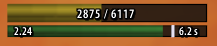
The two readouts show the same buffer answering different questions: **2875 / 6117** is the
largest single hit it would still swallow, **807 / 918** is how much damage it absorbs. On the
lower bar, `2.24` is the current attack speed and the white marker is the swing, riding the expiry
bar the way pfUI's mana tick rides the mana bar.
*(Click any image for full size.)*
## Features
**The readout** — three elements, no portrait, no name, no health or mana, no title:
1. **Hit threshold** — `current / maximum`, e.g. `2875 / 6117`. The bar's fill is the buffer's
fill. One flat colour by threshold (red / yellow / green), no gradient. Switchable to
**max shield** (`807 / 918`), which is the same buffer expressed as damage absorbed rather
than as the hit that would drain it.
2. **Expiry** — remaining seconds as a number *and* as the bar's width, over the buffer's
8 second lifetime. Re-read five times a second, so it glides rather than steps.
3. **Swing timer** — a marker riding the expiry bar (or its own 1–2 px line, if you prefer),
with the current attack speed printed on the left. Deliberately subordinate.
**How the buffer works** (from the Elemental Weapons tooltip, verbatim): *"Rockbiter: Physical
damage builds up an earthen bulwark equal to 20% of damage dealt, tripled while wearing a shield.
The bulwark absorbs 15% of incoming damage for 8 sec or until it mitigates enough damage. Its
durability cannot exceed 20% of maximum health."*
Note the asymmetry, because it is easy to get backwards: the pool is built **only** by physical
damage you deal, but it absorbs **incoming damage of any kind** — spell damage included.
**Measured, not guessed.** The numbers the addon computes with were verified in game rather than
taken from a wiki: the fill level is the stack count of aura 58127, a full pool is 20 % of max
health, and the absorb rate at rank 3 is 15 % (median over 477 hits) — matching what the tooltip
claims.
**Honest about what it does not know.** Where a value cannot be established — an unknown talent
rank, a missing aura — the frame shows `--` rather than a number derived from a guess.
**What it deliberately is not:** no statistics, no combat reports, no graphs, no history. It is a
live readout. Recording and analysis belong elsewhere.
## Install
**Option A — download (simplest):**
1. Grab **`BulwarkFrame-vX.Y.Z.zip`** from
[**Releases**](https://github.com/ShempError/BulwarkFrame/releases).
*(Use the Release zip, not "Code → Download ZIP" — that names the folder
`BulwarkFrame-master`, which WoW won't load.)*
2. Extract the **`BulwarkFrame`** folder into `Interface\AddOns\`.
3. Restart the client.
**Option B — git (auto-updatable):**
```
cd Interface/AddOns
git clone https://github.com/ShempError/BulwarkFrame.git BulwarkFrame
```
`master` is the stable channel — git-based managers (GitAddonsManager, OctoWoW) stay current with
a `git pull`.
## Usage
| Command | Does |
|---|---|
| `/bulwark` or `/bulwark options` | opens the options panel (also: left-click the minimap button) |
| `/bulwark demo` | runs the display off a synthetic 12 s cycle — judge colours and sizes without a fight (clears the manual hide, so the frame is actually on screen) |
| `/bulwark probe` | dumps the live aura / weapon / talent data to chat **and**, with SuperWoW, to `imports\bulwark_probe.txt` |
| `/bulwark lock` | locks or unlocks dragging |
| `/bulwark show` | pins the frame visible (clears the manual hide and turns off hide-when-idle and combat-only) |
| `/bulwark reset` | restores every setting to its default |
`/bf` works as a short form of all of them. Right-clicking the minimap button shows or hides the
readout.
## Options
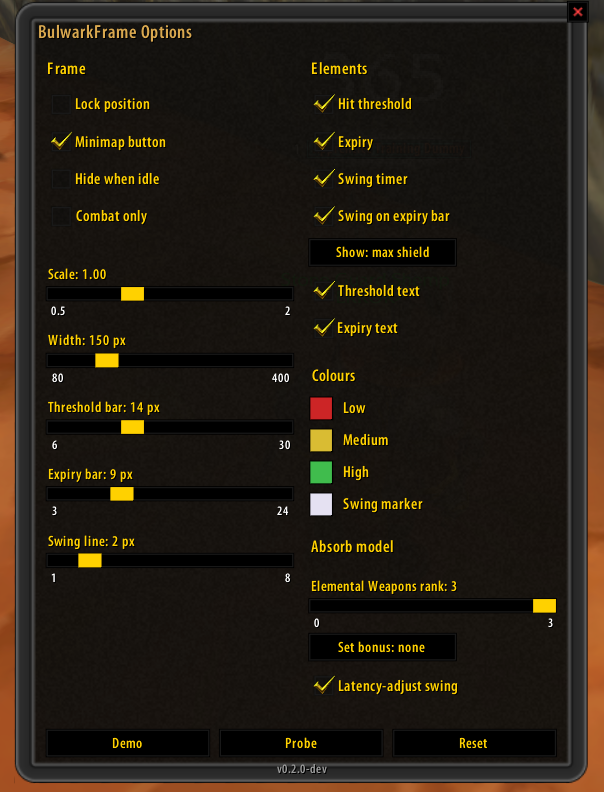
**Frame** — lock, scale, width, per-bar heights, minimap button, hide-when-idle, combat-only.
**Elements** — each of the three readouts and every text label individually; swing marker on the
expiry bar or on its own line; max hit vs. max shield.
**Colours** — the three threshold colours and the swing marker, via the standard colour picker.
**Absorb model** — talent rank (5 / 10 / 15 %), the set-bonus reading, and whether the swing
marker is latency-adjusted.
Every change applies immediately — an options panel whose effect only shows after `/reload`
teaches you to distrust it.
### A note on units
The threshold is in **post-mitigation** damage — the same numbers your combat log shows. The
buffer sits behind armor, block, resist and Stoneskin, so it never sees a boss's raw swing.
Compare the displayed value against the damage you actually take, not against a tooltip.
### The Tier 2.5 set bonus
The bonus is documented as "+3 % absorption" and it is *not* established whether that means
15 → 18 or 15 × 1.03. Both readings are selectable and neither is assumed; the default is off.
## Requirements
**[SuperWoW](https://github.com/balakethelock/SuperWoW) is required.** The addon stays inactive
without it and says so once on login.
This is not a soft preference. The buffer's fill level is read from a specific aura *by spell id*,
which needs SuperWoW; the fallback would be matching on the icon texture, which several unrelated
auras share. That would produce a number that is confidently wrong rather than absent, and a wrong
number on a defensive readout is worse than no readout.
The swing timer likewise resets on SuperWoW's `UNIT_CASTEVENT`, which is language independent and
fires on misses too — unlike parsing combat-log text.
Nothing else is required. No other addon, no client patch.
## For developers
The calculation core is pure Lua with no WoW API, so it runs offline against a real Lua 5.0.3
interpreter — the same version the 1.12 client uses, which is what catches `#table`, `str:find()`
and `string.match` before they reach the game.
```
lua50 tools/luatests/test_calc.lua
lua50 tools/luatests/test_swing.lua
lua50 tools/luatests/test_env.lua
lua50 tools/luatests/test_config.lua
lua50 tools/luatests/test_slash.lua
```
`test_slash.lua` is the exception to "no WoW API offline": it drives the real slash commands and
the real options panel against a small widget stub. The questions it asks — which of the three
suppressors wins, and whether a command re-syncs an open panel — are pure control flow, and that
is reproducible without a client. Rendering, templates and event ordering are not, and stay
in-game work.
**Looking at the UI without the game:** `node tools/uipreview/render.js` draws the frame as a PNG
across six states (full → empty, including both colour steps) at 3× into `tools/uipreview/out/`.
Same geometry and colour buckets as the addon, so the look can be iterated without a client
restart per change.
**Panel art:** `node tools/gen_panel_textures.js` regenerates the options panel's background and
border textures. Zero dependencies, and it verifies its own TGA headers and tiling seams.
## Licence
MIT.
|
The two readouts show the same buffer answering different questions: **2875 / 6117** is the
largest single hit it would still swallow, **807 / 918** is how much damage it absorbs. On the
lower bar, `2.24` is the current attack speed and the white marker is the swing, riding the expiry
bar the way pfUI's mana tick rides the mana bar.
*(Click any image for full size.)*
## Features
**The readout** — three elements, no portrait, no name, no health or mana, no title:
1. **Hit threshold** — `current / maximum`, e.g. `2875 / 6117`. The bar's fill is the buffer's
fill. One flat colour by threshold (red / yellow / green), no gradient. Switchable to
**max shield** (`807 / 918`), which is the same buffer expressed as damage absorbed rather
than as the hit that would drain it.
2. **Expiry** — remaining seconds as a number *and* as the bar's width, over the buffer's
8 second lifetime. Re-read five times a second, so it glides rather than steps.
3. **Swing timer** — a marker riding the expiry bar (or its own 1–2 px line, if you prefer),
with the current attack speed printed on the left. Deliberately subordinate.
**How the buffer works** (from the Elemental Weapons tooltip, verbatim): *"Rockbiter: Physical
damage builds up an earthen bulwark equal to 20% of damage dealt, tripled while wearing a shield.
The bulwark absorbs 15% of incoming damage for 8 sec or until it mitigates enough damage. Its
durability cannot exceed 20% of maximum health."*
Note the asymmetry, because it is easy to get backwards: the pool is built **only** by physical
damage you deal, but it absorbs **incoming damage of any kind** — spell damage included.
**Measured, not guessed.** The numbers the addon computes with were verified in game rather than
taken from a wiki: the fill level is the stack count of aura 58127, a full pool is 20 % of max
health, and the absorb rate at rank 3 is 15 % (median over 477 hits) — matching what the tooltip
claims.
**Honest about what it does not know.** Where a value cannot be established — an unknown talent
rank, a missing aura — the frame shows `--` rather than a number derived from a guess.
**What it deliberately is not:** no statistics, no combat reports, no graphs, no history. It is a
live readout. Recording and analysis belong elsewhere.
## Install
**Option A — download (simplest):**
1. Grab **`BulwarkFrame-vX.Y.Z.zip`** from
[**Releases**](https://github.com/ShempError/BulwarkFrame/releases).
*(Use the Release zip, not "Code → Download ZIP" — that names the folder
`BulwarkFrame-master`, which WoW won't load.)*
2. Extract the **`BulwarkFrame`** folder into `Interface\AddOns\`.
3. Restart the client.
**Option B — git (auto-updatable):**
```
cd Interface/AddOns
git clone https://github.com/ShempError/BulwarkFrame.git BulwarkFrame
```
`master` is the stable channel — git-based managers (GitAddonsManager, OctoWoW) stay current with
a `git pull`.
## Usage
| Command | Does |
|---|---|
| `/bulwark` or `/bulwark options` | opens the options panel (also: left-click the minimap button) |
| `/bulwark demo` | runs the display off a synthetic 12 s cycle — judge colours and sizes without a fight (clears the manual hide, so the frame is actually on screen) |
| `/bulwark probe` | dumps the live aura / weapon / talent data to chat **and**, with SuperWoW, to `imports\bulwark_probe.txt` |
| `/bulwark lock` | locks or unlocks dragging |
| `/bulwark show` | pins the frame visible (clears the manual hide and turns off hide-when-idle and combat-only) |
| `/bulwark reset` | restores every setting to its default |
`/bf` works as a short form of all of them. Right-clicking the minimap button shows or hides the
readout.
## Options
**Frame** — lock, scale, width, per-bar heights, minimap button, hide-when-idle, combat-only.
**Elements** — each of the three readouts and every text label individually; swing marker on the
expiry bar or on its own line; max hit vs. max shield.
**Colours** — the three threshold colours and the swing marker, via the standard colour picker.
**Absorb model** — talent rank (5 / 10 / 15 %), the set-bonus reading, and whether the swing
marker is latency-adjusted.
Every change applies immediately — an options panel whose effect only shows after `/reload`
teaches you to distrust it.
### A note on units
The threshold is in **post-mitigation** damage — the same numbers your combat log shows. The
buffer sits behind armor, block, resist and Stoneskin, so it never sees a boss's raw swing.
Compare the displayed value against the damage you actually take, not against a tooltip.
### The Tier 2.5 set bonus
The bonus is documented as "+3 % absorption" and it is *not* established whether that means
15 → 18 or 15 × 1.03. Both readings are selectable and neither is assumed; the default is off.
## Requirements
**[SuperWoW](https://github.com/balakethelock/SuperWoW) is required.** The addon stays inactive
without it and says so once on login.
This is not a soft preference. The buffer's fill level is read from a specific aura *by spell id*,
which needs SuperWoW; the fallback would be matching on the icon texture, which several unrelated
auras share. That would produce a number that is confidently wrong rather than absent, and a wrong
number on a defensive readout is worse than no readout.
The swing timer likewise resets on SuperWoW's `UNIT_CASTEVENT`, which is language independent and
fires on misses too — unlike parsing combat-log text.
Nothing else is required. No other addon, no client patch.
## For developers
The calculation core is pure Lua with no WoW API, so it runs offline against a real Lua 5.0.3
interpreter — the same version the 1.12 client uses, which is what catches `#table`, `str:find()`
and `string.match` before they reach the game.
```
lua50 tools/luatests/test_calc.lua
lua50 tools/luatests/test_swing.lua
lua50 tools/luatests/test_env.lua
lua50 tools/luatests/test_config.lua
lua50 tools/luatests/test_slash.lua
```
`test_slash.lua` is the exception to "no WoW API offline": it drives the real slash commands and
the real options panel against a small widget stub. The questions it asks — which of the three
suppressors wins, and whether a command re-syncs an open panel — are pure control flow, and that
is reproducible without a client. Rendering, templates and event ordering are not, and stay
in-game work.
**Looking at the UI without the game:** `node tools/uipreview/render.js` draws the frame as a PNG
across six states (full → empty, including both colour steps) at 3× into `tools/uipreview/out/`.
Same geometry and colour buckets as the addon, so the look can be iterated without a client
restart per change.
**Panel art:** `node tools/gen_panel_textures.js` regenerates the options panel's background and
border textures. Zero dependencies, and it verifies its own TGA headers and tiling seams.
## Licence
MIT.