
ErrorGuildMarket
Commands use the short form: /egm. The addon folder stays EGM, so updates keep your saved data.
Guild buy orders with C.O.D. delivery for TurtleWoW / OctoWoW (WoW 1.12.1, Vanilla).
A guild member posts what he wants to buy and at which price; other members deliver it by mail as a C.O.D. and get paid on pickup. ErrorGuildMarket keeps the orders in sync between guildmates, sends the mails for you, and checks every incoming C.O.D. against the order before you pay. Standalone, no dependencies.

Early test version. ErrorGuildMarket is new, so use it at your own risk. It only works between members of the same guild, and every trade is a normal C.O.D. mail that you can see in your mailbox. If something does not work as intended, your guild mates can send the gold or items back - that is what the guild is for. Feedback is welcome.
What's new - 0.1.10 · 2026-11-10
Fixed: very large orders were dropped by 0.1.9; versions 0.1.8 and 0.1.10 sync with each other again.
Earlier in 0.1.9:
- Mailbox freeze fixed. With some inboxes the game froze as soon as the mailbox opened. ErrorGuildMarket now reads the inbox at most once a second instead of on every inbox update. Thanks to the guild member who tracked it down.
- Safer synced orders. Orders and deliveries with impossible amounts (non-numbers, endless or huge quantities, negative prices) are ignored, and delivery previews show at most 12 mails ("+N more"), so a broken order can never hang your game.
Earlier in 0.1.8:
- Delivering works next to other mail addons that replace the game's attach function ("Could not attach item (refused by the client)").
Earlier in 0.1.7:
- New name: ErrorGuildMarket. Commands stay
/egm, the folder staysEGM, your saved data carries over. - The window no longer opens by itself at the mailbox. Turn on "Open with the mailbox" in the options if you want it back.
- Soulbound copies are skipped when delivering, and "Could not attach item" now shows the game's own reason.
Earlier in 0.1.6:
- Sync status. The bottom-left box shows whether your order data is current: in sync with guildmates, still syncing, or alone with the time of the last full sync. Hover it for details and a warning when something may be missing.
Earlier in 0.1.5:
- 7-day orders. Create Order offers 24 hours, 48 hours and 7 days; time left of two days and more reads in days.
- Statistics with a filter list like Browse: pick Volume, Fulfillment or Payment and All Time, 30 Days or 7 Days on the left.
- Deliver asks first and says exactly what is sent and charged; can be switched off in the options.
Earlier in 0.1.4:
-
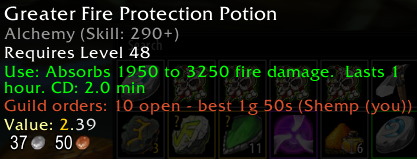
Guild orders in item tooltips. Hover any item (bags, bank, vendor, mail, auction, trade, chat links) to see its open guild orders: total open, best price and buyer, the top three orders. Can be switched off in the options.

Version history - details in CHANGELOG.md.
Screenshots
 Browse - orders you can deliver from your bags |
 Create Order - search any item, set price, quantity and duration |
 My Orders - state, deliveries and payments of your orders |
 Statistics - who delivers and who pays, by period |
Features
- Browse - open guild orders, filtered by item and buyer, with how much of each you can deliver from your bags. Deliver sends the mails as C.O.D. for you, one stack per mail.
- Create Order - search every tradeable item by name, set unit price, quantity and 24h/48h duration. A budget line shows what your open orders may still cost.
- My Orders - state of your own orders (open, in transit, filled, cancelled, expired), every delivery with its payment status, cancel and "Mark Received".
- Statistics - class-colored meters for buyers and sellers: fulfillment, payment, volume, by period.
- C.O.D. validation - an incoming C.O.D. is marked Verified only if the sender is a guild member, he announced exactly this delivery, the item, quantity and price match the order, and nothing is overdelivered. Everything else shows Mismatch or Unknown, with the reason. "Pay Verified" pays only verified mails; optional auto-pay is off by default.
- Penalty rule - new orders are blocked only while you owe an unpaid C.O.D., or after you actively returned a verified delivery. Letting a mail expire or returning a mismatching one never counts against you.
- Guild-scoped data - events are stored per realm and guild and synced over the guild addon channel. Only guild members take part; a character without a guild sees "Join a guild to use ErrorGuildMarket".
- Options - whisper the buyer after a delivery, auto-pay verified C.O.D., open with the mailbox, minimap button, UI scale.
Options

/egm options or the minimap button opens the options: whisper the buyer after a delivery, auto-pay verified C.O.D., open with the mailbox, minimap button and the UI scale slider.
How it works
Buyer
- Open
/egm, go to Create Order, pick the item, set price per unit and quantity, confirm. - The order appears for all guildmates who run ErrorGuildMarket.
- When a C.O.D. mail arrives, ErrorGuildMarket shows it under Incoming C.O.D. in Browse as Verified, Mismatch or Unknown. Pay it at the mailbox (or with Pay Verified).
Seller
- Open the mailbox or
/egm, Browse lists the orders you can fill from your bags. - Select an order, choose the amount, press Deliver. ErrorGuildMarket sends the C.O.D. mails and announces them to the guild.
- The buyer pays on pickup; the order updates for everyone.
Slash commands
| Command | Effect |
|---|---|
/egm |
Toggle the window |
/egm options |
Open the options window |
/egm debug |
Toggle debug output and the inbox trace export |
Install
- Download the repository and put the folder into
Interface\AddOns\. The folder must be named EGM (so thatEGM\EGM.tocexists). - Restart the client. Every guildmate who should take part needs ErrorGuildMarket too.
Known limits
- Orders are only visible to guildmates who run ErrorGuildMarket; history syncs when they are online.
- ErrorGuildMarket does not move gold itself: payment is the normal C.O.D. pickup.
- A character in a guild whose name is not yet loaded (right after login) cannot create orders for a few seconds.
- Vanilla 1.12 only (Lua 5.0).
License
MIT, see LICENSE.