# TotemBar
A lightweight shaman totem bar for **TurtleWoW / WoW 1.12.1 (Vanilla)**.
Pick one totem per element, cast it with a click, cycle alternatives from a
hover flyout, or drop all four with a single press. Every slot shows **how
long the totem still stands** (outer ring, green → red) and **when it pulses
next** (inner ring in the element's color) — with timings taken from actual
server data, not guesswork. No dependencies; adopts the
[pfUI](https://github.com/shagu/pfUI) look automatically when present.
 ## What's new — v0.4.1 · 2026-08-31
- **A totem destroyed inside the recall attribution window stays dead.** A totem the enemy
destroyed in the ~0.4s window between a Totemic Recall wipe and its refusal being attributed
no longer has its countdown resurrected by the refused-recall restore.
**Version history** — details in [CHANGELOG.md](CHANGELOG.md):
- **v0.4.1** (2026-08-31) — a totem destroyed by the enemy inside the recall attribution
window now stays dead instead of coming back when a refused Totemic Recall restores its
timers.
- **v0.4.0** (2026-08-30) — a totem destroyed before its timer ran out is now
detected and cleared (countdown, ring, pulse and range tint together) instead
of counting down as if it still stood; a totem cast refused for lack of mana
no longer starts a countdown (the Clearcasting exemption never applied to
totems); a Totemic Recall the server refuses no longer wipes your timers.
- **v0.3.0** (2026-08-15) — element buttons and the flyout now dim totems you
can't afford; a refused cast no longer starts a phantom countdown, and one
that already started can now be taken back after the fact (narrowly, and
never at the risk of clearing a real timer). Also fixes Totemic Recall
wiping or wasting itself around a press that couldn't go out or one queued
behind the global cooldown, Sentry Totem's timer expiring early, the
seventh Air totem being unreachable, Windwall's range tint sticking on
with Strength of Earth also up, the pulse ring jumping on another
shaman's tick, the out-of-range tint missing most of a set under pfUI, and
the duration ring double-counting with Totemic Mastery talented.
- **v0.2.5** (2026-07-25) — new option **"Show drop-all button"**: hide the
drop-all-totems button if you fire it from a keybind or macro and would rather
not spend a slot on it. The keybind keeps working while it's hidden, and in the
1×6 layout the bar shrinks instead of leaving dead space.
- **v0.2.4** (2026-07-14) — Totemic Recall no longer refuses to fire after a
`/reload`: the "no totems out" guard relied on in-memory tracking that a reload
wipes, and 1.12 offers no way to re-detect totems placed beforehand. Also a
shared spellbook index, killing a multi-millisecond hitch when dropping four
totems from one macro press.
- **v0.2.3** (2026-07-13) — fixes a bug where dropping your set could make the
new totems vanish an instant later: with nampower, Totemic Recall was queued
behind the global cooldown and fired *after* the (off-GCD) totems were
placed, sweeping them. Recall now bypasses the spell queue so it can't pull a
fresh set.
- **v0.2.2** (2026-07-10) — "Button spacing" slider in the options panel;
keybind casts now feed TotemBar's own duration/pulse timers (previously
only click-casts and pfUI did); removed the dead `pulseGlow` setting.
- **v0.2.1** (2026-07-10) — tooltips now show your highest known rank (they
read rank-1 values before; the cast itself was always highest-rank) and
display the rank next to the name.
- **v0.1.3** (2026-07-09) — Totemic Recall no longer wastes its 6s cooldown
when no totems are out.
- **v0.1.2** (2026-07-09) — mana cost on the drop-set tooltip, live refund
estimate on the Recall tooltip, Totemic Mastery duration bonus, rank-aware
mana scan.
- **v0.1.1** (2026-07-09) — key bindings (Esc menu section for every action
and every single totem), drop-set bar button, hover-bind mode with
per-button key labels.
- **v0.1.0** (2026-07-09) — first public release: element buttons, hover
flyout, "Totems" macro with recall guard, minimap button, options panel,
duration timers, out-of-range tint.
## Screenshots
| The bar & flyout | Options panel |
| :---: | :---: |
|
## What's new — v0.4.1 · 2026-08-31
- **A totem destroyed inside the recall attribution window stays dead.** A totem the enemy
destroyed in the ~0.4s window between a Totemic Recall wipe and its refusal being attributed
no longer has its countdown resurrected by the refused-recall restore.
**Version history** — details in [CHANGELOG.md](CHANGELOG.md):
- **v0.4.1** (2026-08-31) — a totem destroyed by the enemy inside the recall attribution
window now stays dead instead of coming back when a refused Totemic Recall restores its
timers.
- **v0.4.0** (2026-08-30) — a totem destroyed before its timer ran out is now
detected and cleared (countdown, ring, pulse and range tint together) instead
of counting down as if it still stood; a totem cast refused for lack of mana
no longer starts a countdown (the Clearcasting exemption never applied to
totems); a Totemic Recall the server refuses no longer wipes your timers.
- **v0.3.0** (2026-08-15) — element buttons and the flyout now dim totems you
can't afford; a refused cast no longer starts a phantom countdown, and one
that already started can now be taken back after the fact (narrowly, and
never at the risk of clearing a real timer). Also fixes Totemic Recall
wiping or wasting itself around a press that couldn't go out or one queued
behind the global cooldown, Sentry Totem's timer expiring early, the
seventh Air totem being unreachable, Windwall's range tint sticking on
with Strength of Earth also up, the pulse ring jumping on another
shaman's tick, the out-of-range tint missing most of a set under pfUI, and
the duration ring double-counting with Totemic Mastery talented.
- **v0.2.5** (2026-07-25) — new option **"Show drop-all button"**: hide the
drop-all-totems button if you fire it from a keybind or macro and would rather
not spend a slot on it. The keybind keeps working while it's hidden, and in the
1×6 layout the bar shrinks instead of leaving dead space.
- **v0.2.4** (2026-07-14) — Totemic Recall no longer refuses to fire after a
`/reload`: the "no totems out" guard relied on in-memory tracking that a reload
wipes, and 1.12 offers no way to re-detect totems placed beforehand. Also a
shared spellbook index, killing a multi-millisecond hitch when dropping four
totems from one macro press.
- **v0.2.3** (2026-07-13) — fixes a bug where dropping your set could make the
new totems vanish an instant later: with nampower, Totemic Recall was queued
behind the global cooldown and fired *after* the (off-GCD) totems were
placed, sweeping them. Recall now bypasses the spell queue so it can't pull a
fresh set.
- **v0.2.2** (2026-07-10) — "Button spacing" slider in the options panel;
keybind casts now feed TotemBar's own duration/pulse timers (previously
only click-casts and pfUI did); removed the dead `pulseGlow` setting.
- **v0.2.1** (2026-07-10) — tooltips now show your highest known rank (they
read rank-1 values before; the cast itself was always highest-rank) and
display the rank next to the name.
- **v0.1.3** (2026-07-09) — Totemic Recall no longer wastes its 6s cooldown
when no totems are out.
- **v0.1.2** (2026-07-09) — mana cost on the drop-set tooltip, live refund
estimate on the Recall tooltip, Totemic Mastery duration bonus, rank-aware
mana scan.
- **v0.1.1** (2026-07-09) — key bindings (Esc menu section for every action
and every single totem), drop-set bar button, hover-bind mode with
per-button key labels.
- **v0.1.0** (2026-07-09) — first public release: element buttons, hover
flyout, "Totems" macro with recall guard, minimap button, options panel,
duration timers, out-of-range tint.
## Screenshots
| The bar & flyout | Options panel |
| :---: | :---: |
| 
 |
|  |
| Key bindings | Hover-bind mode |
| :---: | :---: |
|
|
| Key bindings | Hover-bind mode |
| :---: | :---: |
|  |
| 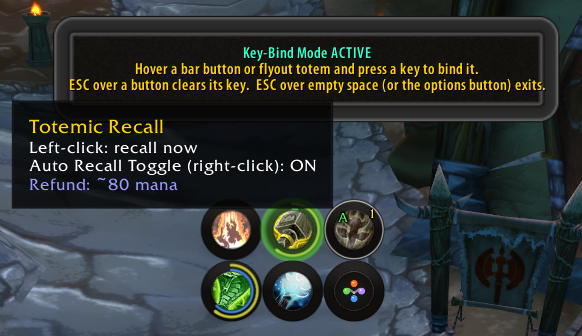 |
*(Click any image for full size.)*
## Features
**Casting**
- One button per element (Fire / Earth / Water / Air): left-click casts the
chosen totem, right-click clears the slot.
- Hover flyout with your other known totems per element — left-click casts
once, right-click makes it the new default.
- **Drop-set button** and a one-press **"Totems" macro** cast all four chosen
totems at once, guarded against accidental double presses (so a fast second
press won't recall the set you just placed).
- Dedicated **Totemic Recall** button that only fires when totems are
actually out — never wastes Recall's 6s cooldown. Right-click toggles
auto-recall-before-redeploy.
**At-a-glance timing**
- **Duration ring:** the outer ring drains with the totem's lifetime,
colored green → yellow → orange → red by remaining time.
- **Pulse ring:** the inner arc (element color) fills toward the next pulse —
intervals and first-tick behavior derived from TurtleWoW server data, water
totems locked onto their real observed ticks.
- **Pulse waves:** an expanding ripple marks each pulse, a soft halo
announces it just before, and a spawn ripple confirms each placement.
- Optional countdown text under each slot; totems tint red when you leave
their range (buff-presence based), and the Recall button pulses while
anything is out of range.
- **Totems you cannot afford are dimmed** — buttons and flyout, from the real
cost of your highest known rank; the dim composes with the range tint instead
of overwriting it, and stands down while Clearcasting is up.
- **Countdowns only start for casts that could go out** — a press refused for
mana or a real cooldown is not tracked, so no phantom timer and no wasted
Totemic Recall on an empty board. A second check catches what that cannot
predict (movement, a stun, a server-side refusal) and takes the countdown
back after the fact — narrowly filtered to the totem just pressed, so it
stays silent whenever it can't be sure rather than risk clearing a timer
for a totem that is actually still out.
- Native cooldown swipes and real in-game spell tooltips everywhere.
**Control**
- **Key bindings:** an Esc → Key Bindings section for every action — including
a binding for every single totem you know — plus a fast **hover-bind mode**
(hover a button, press a key). Bound keys show on the buttons.
- **Layouts:** one row (1×6), two rows (2×3, elements grouped 2×2) or three
rows (3×2), switchable live.
- **Minimap button** (drag to reposition, left-click options, right-click
toggles the bar) and a skinned **options panel** for everything else.
- **Assignment seam** for future raid tools: an external addon can *suggest*
a totem set via `TotemBar.ReceiveAssignment` — shown as a one-click apply
panel, never auto-cast. See [`docs/API.md`](docs/API.md).
## Install
**Option A — download (simplest):**
1. Grab **`TotemBar-vX.Y.Z.zip`** from
[**Releases**](https://github.com/ShempError/TotemBar/releases).
*(Use the Release zip, not "Code → Download ZIP" — that names the folder
`TotemBar-master`, which WoW won't load.)*
2. Extract the **`TotemBar`** folder into `Interface\AddOns\`.
3. Restart the client.
**Option B — git (auto-updatable):**
```
cd Interface/AddOns
git clone https://github.com/ShempError/TotemBar.git TotemBar
```
`master` is the stable release channel — git-based managers
(GitAddonsManager, OctoWoW) stay current with a `git pull`. `dev` is
work-in-progress.
## Usage
| Action | Effect |
| --- | --- |
| Left-click element button | Cast that element's chosen totem |
| Right-click element button | Clear that element's slot |
| Hover element button | Flyout with the element's other known totems |
| Left-click flyout totem | Cast it once (default unchanged) |
| Right-click flyout totem | Set it as the slot's new default |
| Left-click Recall | Cast Totemic Recall (only when totems are out) |
| Right-click Recall | Toggle auto-recall |
| Left-click drop-set button | Cast all four chosen totems |
| Minimap button | Left: options · Right: toggle bar · Drag: reposition |
**Slash commands:** `/tb` (toggle bar) · `/tb options` · `/tb lock` ·
`/tb bind` (hover-bind mode) · `/tb scan`, `/tb assign`, `/tb manadump`,
`/tb pulsecal` (dev aids).
**The "Totems" macro:** options panel → **Create 'Totems' macro**, then drag
the `Totems` macro to your action bar. One press recalls (if auto-recall is
on) and redeploys all four chosen totems.
## Options
Open with the minimap button or `/tb options`.
| Option | Does |
| --- | --- |
| Lock bar | Disable dragging |
| Auto-recall before setting | Recall first when the macro/drop-set fires |
| Show bar | Show/hide the whole bar |
| Show drop-all button | Show/hide the drop-all-totems button; its keybind keeps working either way |
| Show duration ring | Outer remaining-time ring (traffic-light colors) |
| Show pulse ring | Inner next-pulse arc (element color) |
| Show pulse waves | Ripple + glow effects on pulses |
| Show countdown text | Remaining-seconds text under each slot |
| Layout | Cycle 1×6 / 2×3 / 3×2 |
| Recall guard (sec) | Double-press protection window |
| Cycle reset gap (sec) | When macro cycling restarts at totem 1 |
| UI size | Scales bar + flyout from the top-left corner |
| Reset position / Create macro / Key bind mode | One-click actions |
## Requirements
- A WoW 1.12.1 client (TurtleWoW). **No addon dependencies.**
Optional, auto-detected: **pfUI** (skinned widgets; its `libtotem` feeds the
timers as an extra source) and **SuperWoW** (only used by the `/tb scan` /
`/tb pulsecal` dev aids for file exports).
## For developers
- Public API for companion addons: [`docs/API.md`](docs/API.md).
- Pure-logic modules under `core/` are unit-tested offline against a real
Lua 5.0.3 interpreter (`tools/luatests/`, 19 suites). WoW-API files are
syntax-checked; in-game behavior is verified on TurtleWoW.
- All textures are **generated**: `tools/gen_*.js` (zero-dependency Node)
render the ring/FX/icon/panel sheets as 1.12-safe TGAs, and
`tools/preview_*.js` composite them into PNG previews for review without
launching the client.
- `/reload` covers changes to existing `.lua` files; a client restart is
needed for `.toc` changes, new files, or changed textures (the client
caches them).
## License
MIT (see LICENSE).
|
*(Click any image for full size.)*
## Features
**Casting**
- One button per element (Fire / Earth / Water / Air): left-click casts the
chosen totem, right-click clears the slot.
- Hover flyout with your other known totems per element — left-click casts
once, right-click makes it the new default.
- **Drop-set button** and a one-press **"Totems" macro** cast all four chosen
totems at once, guarded against accidental double presses (so a fast second
press won't recall the set you just placed).
- Dedicated **Totemic Recall** button that only fires when totems are
actually out — never wastes Recall's 6s cooldown. Right-click toggles
auto-recall-before-redeploy.
**At-a-glance timing**
- **Duration ring:** the outer ring drains with the totem's lifetime,
colored green → yellow → orange → red by remaining time.
- **Pulse ring:** the inner arc (element color) fills toward the next pulse —
intervals and first-tick behavior derived from TurtleWoW server data, water
totems locked onto their real observed ticks.
- **Pulse waves:** an expanding ripple marks each pulse, a soft halo
announces it just before, and a spawn ripple confirms each placement.
- Optional countdown text under each slot; totems tint red when you leave
their range (buff-presence based), and the Recall button pulses while
anything is out of range.
- **Totems you cannot afford are dimmed** — buttons and flyout, from the real
cost of your highest known rank; the dim composes with the range tint instead
of overwriting it, and stands down while Clearcasting is up.
- **Countdowns only start for casts that could go out** — a press refused for
mana or a real cooldown is not tracked, so no phantom timer and no wasted
Totemic Recall on an empty board. A second check catches what that cannot
predict (movement, a stun, a server-side refusal) and takes the countdown
back after the fact — narrowly filtered to the totem just pressed, so it
stays silent whenever it can't be sure rather than risk clearing a timer
for a totem that is actually still out.
- Native cooldown swipes and real in-game spell tooltips everywhere.
**Control**
- **Key bindings:** an Esc → Key Bindings section for every action — including
a binding for every single totem you know — plus a fast **hover-bind mode**
(hover a button, press a key). Bound keys show on the buttons.
- **Layouts:** one row (1×6), two rows (2×3, elements grouped 2×2) or three
rows (3×2), switchable live.
- **Minimap button** (drag to reposition, left-click options, right-click
toggles the bar) and a skinned **options panel** for everything else.
- **Assignment seam** for future raid tools: an external addon can *suggest*
a totem set via `TotemBar.ReceiveAssignment` — shown as a one-click apply
panel, never auto-cast. See [`docs/API.md`](docs/API.md).
## Install
**Option A — download (simplest):**
1. Grab **`TotemBar-vX.Y.Z.zip`** from
[**Releases**](https://github.com/ShempError/TotemBar/releases).
*(Use the Release zip, not "Code → Download ZIP" — that names the folder
`TotemBar-master`, which WoW won't load.)*
2. Extract the **`TotemBar`** folder into `Interface\AddOns\`.
3. Restart the client.
**Option B — git (auto-updatable):**
```
cd Interface/AddOns
git clone https://github.com/ShempError/TotemBar.git TotemBar
```
`master` is the stable release channel — git-based managers
(GitAddonsManager, OctoWoW) stay current with a `git pull`. `dev` is
work-in-progress.
## Usage
| Action | Effect |
| --- | --- |
| Left-click element button | Cast that element's chosen totem |
| Right-click element button | Clear that element's slot |
| Hover element button | Flyout with the element's other known totems |
| Left-click flyout totem | Cast it once (default unchanged) |
| Right-click flyout totem | Set it as the slot's new default |
| Left-click Recall | Cast Totemic Recall (only when totems are out) |
| Right-click Recall | Toggle auto-recall |
| Left-click drop-set button | Cast all four chosen totems |
| Minimap button | Left: options · Right: toggle bar · Drag: reposition |
**Slash commands:** `/tb` (toggle bar) · `/tb options` · `/tb lock` ·
`/tb bind` (hover-bind mode) · `/tb scan`, `/tb assign`, `/tb manadump`,
`/tb pulsecal` (dev aids).
**The "Totems" macro:** options panel → **Create 'Totems' macro**, then drag
the `Totems` macro to your action bar. One press recalls (if auto-recall is
on) and redeploys all four chosen totems.
## Options
Open with the minimap button or `/tb options`.
| Option | Does |
| --- | --- |
| Lock bar | Disable dragging |
| Auto-recall before setting | Recall first when the macro/drop-set fires |
| Show bar | Show/hide the whole bar |
| Show drop-all button | Show/hide the drop-all-totems button; its keybind keeps working either way |
| Show duration ring | Outer remaining-time ring (traffic-light colors) |
| Show pulse ring | Inner next-pulse arc (element color) |
| Show pulse waves | Ripple + glow effects on pulses |
| Show countdown text | Remaining-seconds text under each slot |
| Layout | Cycle 1×6 / 2×3 / 3×2 |
| Recall guard (sec) | Double-press protection window |
| Cycle reset gap (sec) | When macro cycling restarts at totem 1 |
| UI size | Scales bar + flyout from the top-left corner |
| Reset position / Create macro / Key bind mode | One-click actions |
## Requirements
- A WoW 1.12.1 client (TurtleWoW). **No addon dependencies.**
Optional, auto-detected: **pfUI** (skinned widgets; its `libtotem` feeds the
timers as an extra source) and **SuperWoW** (only used by the `/tb scan` /
`/tb pulsecal` dev aids for file exports).
## For developers
- Public API for companion addons: [`docs/API.md`](docs/API.md).
- Pure-logic modules under `core/` are unit-tested offline against a real
Lua 5.0.3 interpreter (`tools/luatests/`, 19 suites). WoW-API files are
syntax-checked; in-game behavior is verified on TurtleWoW.
- All textures are **generated**: `tools/gen_*.js` (zero-dependency Node)
render the ring/FX/icon/panel sheets as 1.12-safe TGAs, and
`tools/preview_*.js` composite them into PNG previews for review without
launching the client.
- `/reload` covers changes to existing `.lua` files; a client restart is
needed for `.toc` changes, new files, or changed textures (the client
caches them).
## License
MIT (see LICENSE).