
7.5 KiB
pfExtend
English | 简体中文
pfExtend is an extension addon for pfQuest, providing monster loot display, quest chain visualization and quest reward lookup. Compatible with Turtle WoW (1.12.0 client).
Features
ShowLoots - Monster Loot Display
When hovering over a monster, automatically displays its full loot table in the tooltip.
 Key Features:
- Real-time Loot Preview: Hover over any monster to see its complete drop list directly in the game tooltip
- Drop Rate Visualization: Shows exact drop percentages with color-coded indicators (green = common, red = rare)
- Smart Filtering: Filter loot by item quality (Poor, Common, Uncommon, Rare, Epic, Legendary)
- Favorites System: Mark items as favorites to highlight them in the loot list (favorited items appear at top)
- Detailed Browser: Press
Alt+Ctrlwhile hovering to open a full loot browser window showing:- Item links with quality colors
- Exact drop rates with percentage coloring
- Item sources (NPCs, Objects, Vendors)
- Zone locations for each source
- Reference loot tables support (indirect drops)
- Clickable item links for detailed inspection
Supported Loot Types:
- Unit (NPC) Drops: Direct monster loot
- Object Loot: Chests, containers, mining nodes, herbs, etc.
- Reference Tables: Complex loot tables linking multiple sources (e.g., "World Drop" tables)
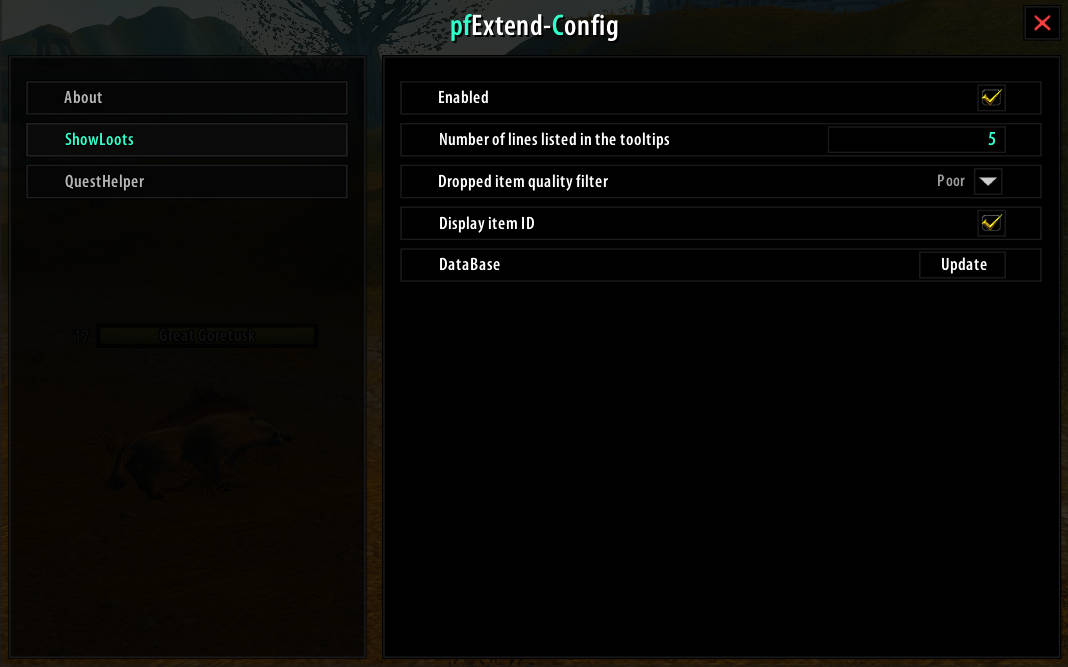
Configuration Options:
- Enable/disable the feature
- Set maximum number of items displayed in tooltip
- Filter by minimum item quality (hide junk items)
- Toggle item ID display in browser
QuestHelper - Quest Chain Browser
A powerful quest chain visualization tool integrated into the World Map, with quest reward lookup and quest detail viewing.

Key Features:
- Interactive Quest Tree: Displays all available quests in current zone as an expandable tree structure
- Quest Chain Visualization: Automatically builds and displays complete quest chains (prerequisites → follow-ups)
- Smart Quest Filtering: Automatically filters quests by:
- Race compatibility
- Class requirements
- Profession requirements
- Level requirements
- Event quests
- Prerequisite completion status
Quest Status Indicators:
| Color | Tag | Meaning |
|---|---|---|
| ● Green | Active | Currently in quest log |
| ● Yellow | Available | Can be accepted now |
| ● Red | Prereq | Missing prerequisite quests |
| ● Red | High-Level | Level requirement not met |
| ● Gray | Finished | Completed (dimmed if all follow-ups done) |
| ● Gray | Race/Class/Skill | Requirements not met |
| ● Blue | Event | Seasonal or event quest |
| ● Yellow | Hidden | Starts from item drop |
Interactive Map Integration:
- Map Toggle Button: Quick access button on World Map (
QHbutton) - Quest Pinning: Click any quest to pin it on the world map
- Automatic Map Markers: Shows quest giver locations (NPCs, Objects, Items)
- Smart Clustering: Groups nearby quest markers to reduce clutter
- Cross-Zone Tracking:
- Click to track quests from other zones (auto-switch map)
- Ctrl+Click to find and track prerequisite quests in their respective zones
Quest Chain Navigation:
- Expandable Tree: Click
+/-to expand or collapse quest chains - Double-Click: Expand/collapse entire subtree at once
- Auto-Expand: Automatically expands the tree to quests currently in your quest log
- Auto-Scroll: Automatically scrolls to relevant quest when switching zones
- Persistent Pins: Quest pins remain on map until manually removed
Quest Log Chain Viewer:
- Quests in the quest log that have follow-ups show a chain button; click it to open a window listing all follow-up quests
- In the chain window: click to locate the quest on the World Map, Shift+Click to insert a quest link into chat
Quest Rewards in Tooltips:
- Quest tooltips automatically show reward information:
- Experience
- Max-level money (the data source only provides max-level converted money)
- Fixed reward items / choice reward items (with quality colors and counts)
- Toggleable in settings (QuestHelper → Show rewards in quest tooltips)
- Reward data covers 6000+ quests (including all Turtle WoW custom quests), sourced from OctoWow Database
Quest Detail Window:
- Right-click a quest name in the chain list or chain window to open a detail window showing:
- Quest title (with level, colored by difficulty)
- Objective text and live progress (for quests in your quest log)
- Full description text
- Rewards: XP, max-level money, item icon rows (hover icons for item tooltips, Shift+Click to insert item links)
- The window is draggable and closes with Esc
Advanced Features:
- Prerequisite Finder: Automatically locates prerequisite quests when current quest is unavailable
- Multi-Zone Support: Handles quests available in multiple zones or locations
- Item-Start Quests: Tracks quests that begin from item drops (with drop source locations)
- Unified Cache: Optimized database for fast quest zone lookups
Dependencies
- pfQuest - Required database provider
- pfQuest-turtle / pfQuest-octo - Additional database for Turtle WoW (required only for Turtle WoW)
- pfUI - Recommended UI framework (optional)
Installation
- Download the latest release (
pfExtend_X.X.X.zip) - Extract to your WoW addons folder:
Interface\AddOns\ - Ensure the folder is named
pfExtend(notpfExtend_X.X.X) - Restart the game or reload UI (
/reload)
Commands
| Command | Description |
|---|---|
/pfex |
Open pfExtend configuration window |
Configuration
Access settings via:
- Slash command:
/pfex - Browser window settings button (gear icon)

Database Update
The loot display and quest chain features require a one-time database initialization:
- Automatically updates on first login after installation
- Manual update available via settings
- Update required when pfQuest database changes
Quest reward data ships as a built-in data file (no initialization needed), covering both vanilla and Turtle WoW custom quests.
For Developers
The questGaindb/ directory is the scraping workspace for quest reward data (not needed by players):
- Includes a Python scraper that fetches quest rewards (items/XP) in bulk from OctoWow Database
- To regenerate the data: run
python scrape.py allinside that directory; the generated data file is automatically synced into the addon - See
questGaindb/README.mdfor details
Compatibility
- Client: World of Warcraft 1.12.0 (Vanilla), compatible with Turtle WoW
- Dependencies: pfQuest (and pfQuest-turtle or pfQuest-octo for Turtle WoW), pfUI (optional)
- Conflicts: None known
Credits
- Author: Cliencer
- Base Framework: pfQuest by Shagu
- UI Framework: pfUI by Shagu
- Other Contributors: roby-brok