
Improved Guild Window
Enhanced guild management for World of Warcraft 1.12.1 (Turtle WoW).
Installation
- Extract
ImprovedGuildWindowfolder toWorld of Warcraft\Interface\AddOns\ - Restart WoW or type
/reload - Open with
/igwor set keybind: ESC → Key Bindings → Improved Guild Window
Features
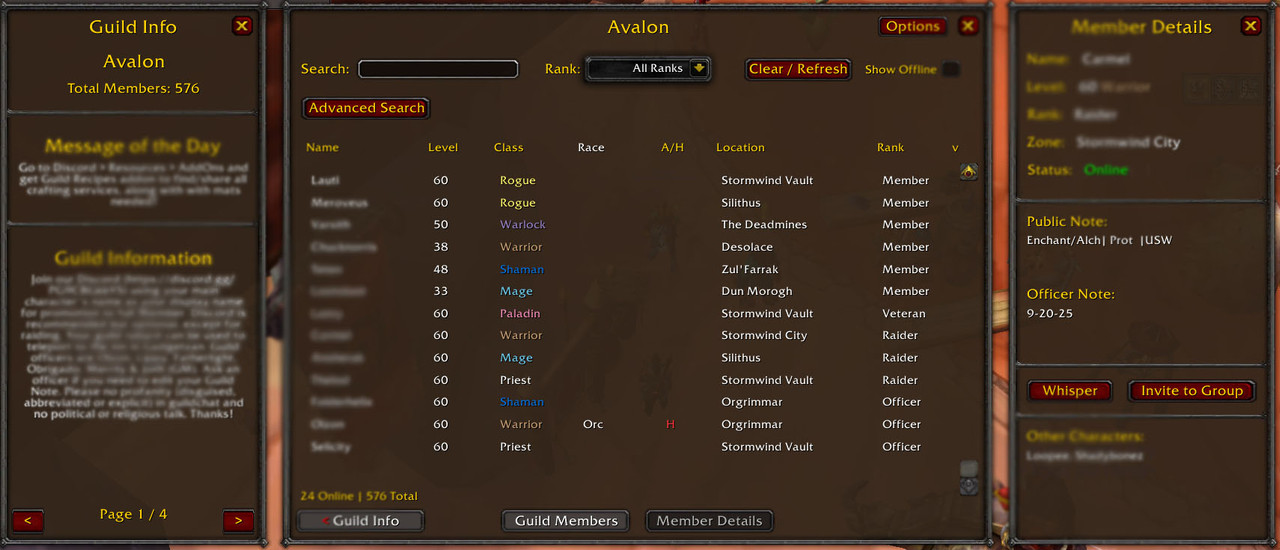
Four View Modes
- Guild Members - Online members only with location/zone info
- Notes & Rank - All members with public notes, officer notes, and last online
- Detailed View - All members with date joined and timezone information
- Guild Info - Statistics and guild information (side panel)
Main Filter Bar
- Search - Quick filter by name, class, rank, or notes
- Rank - Filter by guild rank
- Region - Filter by timezone region (Americas, Oceania, Europe, Asia)
- Show Offline - Toggle offline member visibility
Advanced Search
Click "Advanced Search" for additional filters:
- Public Note search
- Officer Note search
- All filters work together
- "Clear / Refresh" button resets all filters and updates roster
Member Details Panel (Right Side)
Click any member name to view:
- Full member information with race, faction, date joined, and timezone
- Edit public/officer notes (if permitted)
- Other Characters list (requires "Alt of [Name]" in player notes)
- Quick Whisper and Invite buttons
Guild Info Panel (Left Side)
Page 1:
- Guild name
- Guild Members count (excludes members with "Alt" in rank name)
- Guild Member Alts count (members with "Alt" in rank name)
- Message of the Day
- Guild information text
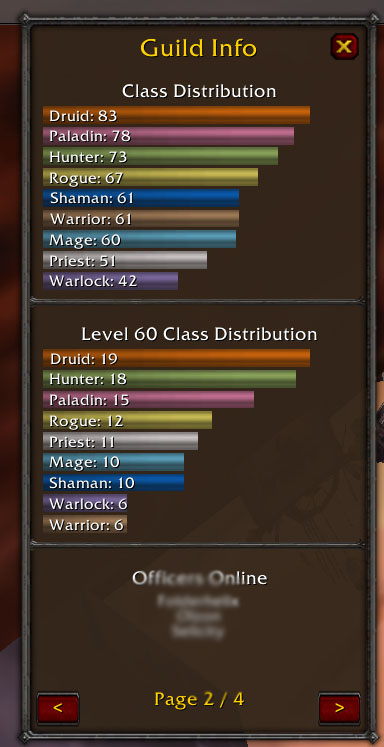
Page 2:
- Class distribution bar graph (all levels)
- Level 60 class distribution bar graph
- Online officers list
Page 3:
- Max level crafters online (300+ skill)
- Grouped by profession (clickable names to whisper)
- Shows: Alchemy, Blacksmithing, Enchanting, Engineering, Jewelcrafting, Leatherworking, Tailoring
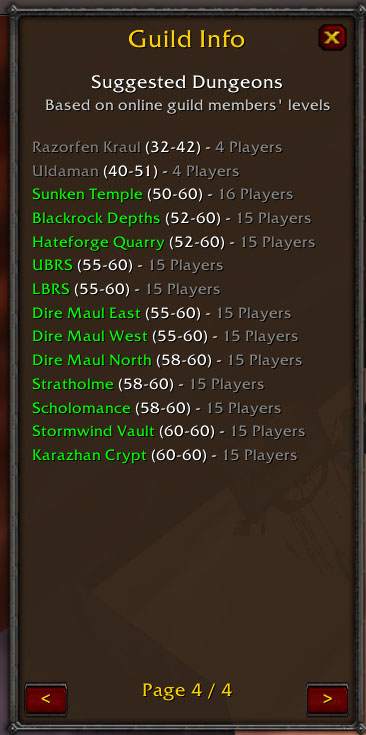
Page 4:
- Suggested Dungeons based on online members' levels
- Shows up to 22 dungeons sorted by minimum level
- Only shows dungeons with at least 4 online members in range
- Displays player count for each dungeon
- Color-coded by your character's level: green (in range), yellow (±3 levels), red (too low), gray (too high)
- Includes all 31 Turtle WoW dungeons (vanilla + custom content)
Options Menu
Click the "Options" button to customize:
- Background Color - Choose from 8 color themes
- Window Opacity - Adjust transparency (30%-100%)
- Remember Windows - Restore open panels between sessions
- Allow Moving Side Windows - Toggle lock/unlock for side panels
- Default View - Set which tab opens by default
- Show Offline by Default - Member Details tab offline visibility
- Remember Sorting - Persist column and direction across sessions
- # of Officer Ranks in Guild - Choose how many top ranks count as officers (2, 3, or 4)
- Show Race & Faction Columns - Toggle Race and A/H columns in the Guild Members tab
Sorting & Filtering
- Click column headers to sort
- Default sort: Level descending on first click
- Rank dropdown filter
- Show/Hide offline members toggle
- Settings persist per-tab when "Remember Sorting" is enabled
Commands
/igw- Toggle window/igw show- Show window/igw hide- Hide window/igw debug- Show debug info
Officer Note Formatting Guide
The addon extracts race, faction, date joined, and timezone information from officer notes using a standardized format. This enables enhanced features in the Detailed View tab, Member Details panel, and Region filter.
Complete Format
Pattern: RACE-MMDDYYTTT
- RACE = 1-2 letter race code followed by dash (-)
- MMDDYY = 6-digit date (Month/Day/Year)
- TTT = 3-letter timezone code
Examples:
Or-030125PST= Orc player who joined March 1st, 2025 in PST timezoneNE-121524EST= Night Elf who joined December 15th, 2024 in EST timezone
Supported Race Codes
Both single-letter and two-letter codes are supported for clarity:
Alliance:
- NE- or N- = Night Elf
- Dw- or D- = Dwarf
- Hu- or H- = Human
- Gn- or G- = Gnome
- HE- or He- = High Elf
Horde:
- Or- or O- = Orc
- Tr- or T- = Troll
- Ta- = Tauren
- Un- or U- = Undead
- Go- = Goblin
Note: Codes are case-insensitive (e.g., HE-, He-, or he- all work)
Supported Timezone Codes
Americas:
- PST (UTC-8), PDT (UTC-7)
- MST (UTC-7), MDT (UTC-6)
- CST (UTC-6), CDT (UTC-5)
- EST (UTC-5), EDT (UTC-4)
Oceania:
- AEST (UTC+10) - Australian Eastern
- NZST (UTC+12) - New Zealand
Europe:
- GMT (UTC+0), UTC (UTC+0)
- CET (UTC+1), EET (UTC+2)
Asia:
- MSK (UTC+3) - Moscow
- IST (UTC+5:30) - India
- JST (UTC+9) - Japan
Flexible Formatting
The addon supports partial formats - you can include only the information you want to track:
Full Format:
Or-030125PST= Race + Date + TimezoneNE-121524EST= Race + Date + Timezone
Date + Timezone (no race):
030125PST= Joined March 1st, 2025 in PST
Race + Date (no timezone):
Hu-030125= Human who joined March 1st, 2025
Race + Timezone (no date):
Dw-PST= Dwarf player in PST timezone
Timezone Only:
PST= Player in PST timezone (useful for alts)
Race Only:
Un-= Undead player
Additional Text
You can add any additional text after the formatted section:
Or-030125PST Main Tank✓NE- 300 BS/300 LW✓HE- Alt of Mainchar✓Hu-PST Officer✓
The addon will extract the structured data and preserve all text in the officer note field.
Officer Note Best Practices
- Use consistent formatting across all members for easier management
- Main characters should have full format:
RACE-MMDDYYTTT(e.g.,Or-030125PST) - Alt characters can use minimal format:
RACE-TTTor justRACE-(e.g.,Un-ESTorDw-) - Timezone-only works well for members who don't want to share join date
- Add rank/role info after the formatted section:
NE-030125PST MT - Profession info can be in public notes for crafter detection
What Gets Displayed
Guild Members Tab:
- Race column (e.g., "Orc")
- Faction column (A/H with color)
Detailed View Tab:
- Date Joined column (e.g., "03/01/25" or "—")
- Time Zone column (e.g., "PST (UTC-8)" or "—")
Member Details Panel:
- Full member information including all extracted data
- Race shown in "Level: 60 Orc Warrior" format
- Faction icon (Alliance/Horde emblem)
- Date Joined and Time Zone as separate fields
Region Filter:
- Automatically maps timezone to region
- Filter members by: Americas, Oceania, Europe, Asia
Configuration
Crafter Detection (Page 3)
Add profession info to character public notes for automatic detection on Guild Info Page 3.
Supported formats:
BS 300orBlacksmithing 300300 JCor300 JewelcraftingAlchemy: 300orAlch 300- Multiple professions:
300 JC/300 LW
Supported abbreviations:
- Alchemy: Alchemy, Alch, Alc
- Blacksmithing: Blacksmithing, Blacksmith, Smith, BS, B.S.
- Enchanting: Enchanting, Enchant, Ench, Enc
- Engineering: Engineering, Engineer, Eng
- Jewelcrafting: Jewelcrafting, Jewel, JC, J.C.
- Leatherworking: Leatherworking, Leather, LW, L.W.
- Tailoring: Tailoring, Tailor, Tail
Detection requires:
- Skill level 300 or higher
- Player must be online
- Case-insensitive matching
Officer Detection
Configure via Options → # of Officer Ranks in Guild (default: 3). This controls which ranks are shown as online officers on Guild Info Page 2.
- 2 = Guild Master + 1 officer rank
- 3 = Guild Master + 2 officer ranks (default)
- 4 = Guild Master + 3 officer ranks
Alt Detection
Add "Alt of [MainName]" to character public notes for automatic detection. Works bidirectionally - view any character to see their alts and main.
Version
3.3 - Latest stable release
Changelog
3.3
- Added option to hide Race and Faction (A/H) columns in the Guild Members tab
- When hidden, Name and Location columns expand to use the freed space
- Setting saved between sessions and applied immediately on save
3.2
- Added configurable officer rank count setting in Options menu
- New dropdown (2, 3, or 4 ranks) replaces the previous hardcoded value
- Setting is saved between sessions and applied immediately on save
- Increased Options window height to accommodate new setting
3.1
- Added clickable dungeon names on Guild Info Page 4
- Dungeon details popup window with:
- Full dungeon names (e.g., "Scarlet Monastery - Graveyard")
- Location and faction information
- Level range and online player count
- Dungeon description and boss list
- Loading screen backgrounds (175% zoom, 35% overlay)
- Kalimdor fallback background for custom dungeons
- Enhanced race code system:
- Added 2-letter race codes (Hu-, NE-, Dw-, Un-, Or-, Tr-, Gn-)
- Backwards compatible with 1-letter codes
- Case-insensitive support
- Dungeon dialog closes with ESC key or when main window closes
- All text centered in dungeon info window
3.0
- Removed all Calendar features (experimental features discontinued)
- Cleaned up codebase for improved stability
- Guild Info Page 1 now shows separate counts:
- "Guild Members" (excludes ranks with "Alt")
- "Guild Member Alts" (ranks containing "Alt")
- Timezone extraction now works independently of date field
- Support for timezone-only officer notes (e.g., just "PST")
- Comprehensive officer note formatting guide added to README
2.9
- Renamed "Member Details" tab to "Notes & Rank"
- Added new "Detailed View" tab showing: Name, Level, Rank, Date Joined, Time Zone
- Date Joined and Time Zone extracted from officer note format (MMDDYYTTT)
- Timezone displays as "PST (UTC-8)" format
- Defaults to sorting by name ascending
- Shows all members (online and offline)
- Added Region filter dropdown to main filter bar
- Filter options: All, Americas, Oceania, Europe, Asia
- Maps timezones to regions automatically
- Always visible (not part of advanced search)
- Reorganized filter layout
- Moved Clear/Refresh button to advanced search row (right edge)
- Moved Region dropdown to main filter row (next to Rank)
- Evenly spaced 4 elements on filter bar: Search, Rank, Region, Show Offline
- Reorganized main tabs at bottom
- All 4 tabs now evenly distributed across bottom width
- Order: Guild Info → Guild Members → Notes & Rank → Detailed View
- Consistent spacing between all tabs
- Removed Name field from Advanced Search (redundant with main search)
- Fixed timezone/date sorting (prevented nil comparison errors)
- Fixed spacing in Member Details side panel (all rows now 20px spacing)
- Remember Sorting option now properly applies to all 3 main tabs
- Header arrows update when switching tabs to show current sort state
2.8
- Added Guild Info Page 4: Suggested Dungeons
- Enhanced Guild Info Page 2 with Level 60 class distribution
- Fixed keybinding error
- Consistent formatting across all side panel pages
2.7
- Added "Show offline members by default" option
- Added "Remember sorting" option
- Level column defaults to descending on first click
- Clear/Refresh button resets sorting
- Improved sorting persistence
2.4
- Enhanced member details panel layout
- Improved window positioning and drag handling
2.3
- Added Goblin (Go-) and High Elf (He-) race support
- Fixed "Remember Windows" setting
- Default WoW note edit dialogs
- 10 total races now supported
2.2
- Added Race and Faction columns to Guild Members tab
- Race detection from officer notes (dash format)
- Faction column shows "A" (Alliance) or "H" (Horde)
- Clickable crafter names on Guild Info Page 3
2.1
- Added Guild Info Page 3: Max Level Crafters Online
- 7 crafting professions supported
- Flexible profession detection from public notes
2.0
- Complete visual overhaul with solid backgrounds
- Customizable colors (8 themes)
- Adjustable opacity per window (30-100%)
- Options menu with comprehensive settings
- Remember open windows between sessions
- Movable/lockable side panels
Author
Olzon