update launcher, but cant join game
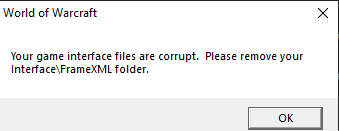
4/30 12:53:03.601 ** Loading table of contents Interface\FrameXML\FrameXML.toc
4/30 12:53:03.601 Couldn't open Interface\FrameXML\Turtle_Barbershop\Turtle_BarbershopTemplates.xml
4/30 12:53:03.601 Couldn't open Interface\FrameXML\Turtle_Barbershop\Turtle_Barbershop.xml
4/30 12:53:03.601 ++ Loading file Interface\FrameXML\Turtle_TransmogUI\Turtle_TransmogUI.xml
4/30 12:53:03.601 Couldn't find inherited node: TransmogPlayerSlotSmall
4/30 12:53:03.601 ++ Loading file Interface\FrameXML\Turtle_ShopUI\Turtle_ShopUI.xml
4/30 12:53:03.601 Texture <unnamed>: Unable to load texture file Interface\ShopFrame\ShopFrame-Featured
4/30 12:53:03.601 Texture <unnamed>: Unable to load texture file Interface\ShopFrame\ShopFrame-Featured
4/30 12:53:03.601 Texture <unnamed>: Unable to load texture file Interface\ShopFrame\ShopFrame-Featured
4/30 12:53:03.601 Texture <unnamed>: Unable to load texture file Interface\ShopFrame\ShopFrame-Featured
4/30 12:53:03.601 Texture <unnamed>: Unable to load texture file Interface\ShopFrame\ShopFrame-Featured
4/30 12:53:03.601 Texture <unnamed>: Unable to load texture file Interface\ShopFrame\ShopFrame-Featured
4/30 12:53:03.601 Texture <unnamed>: Unable to load texture file Interface\ShopFrame\ShopFrame-Featured
4/30 12:53:03.601 Texture <unnamed>: Unable to load texture file Interface\ShopFrame\ShopFrame-Featured
4/30 12:53:03.601 ++ Loading file Interface\FrameXML\LFT\LFT.xml
4/30 12:53:03.601 SETALLPOINTS set to true in frame with anchors (ignored)


