Cant start game

Account help, in-game issues, bug reports, and questions for staff.
Frelancr42
Posts: 5

Re: Cant start game

Post#11 » Wed Apr 29, 2026 7:07 pm

Genocider wrote: Wed Apr 29, 2026 6:59 pm Go to windows system settings, then optional features, view features, see available features and add WMIC.
Restart the launcher
That fixed the issue for me
I still have the FrameXML issue after doing this.

EDIT: I am able to log in characters on a fresh install, but not on my old Twow install. Will update if I find out what the issue is between the two game folders.

User avatar
Archer
Posts: 11

Re: Cant start game

Post#12 » Wed Apr 29, 2026 8:32 pm

We believe we have fixed this issue by migrating away from using WMIC.
This should be resolved with Launcher version 1.0.11
If you have an outdated launcher and are still experiencing this issue please download the new launcher version at
https://octowow.st/download/launcher
If the issue still persists after a fresh download please reply to this post.

It is also worth noting that OctoWoW is build on Twow 1.17.2 so there could be compatibility issue when using the current Twow client.

User avatar
Darktifa
Posts: 81

Re: Cant start game

Post#13 » Wed Apr 29, 2026 9:08 pm

Archer wrote: Wed Apr 29, 2026 8:32 pm We believe we have fixed this issue by migrating away from using WMIC.
This should be resolved with Launcher version 1.0.11
If you have an outdated launcher and are still experiencing this issue please download the new launcher version at
https://octowow.st/download/launcher
If the issue still persists after a fresh download please reply to this post.

It is also worth noting that OctoWoW is build on Twow 1.17.2 so there could be compatibility issue when using the current Twow client.
No, even with the new launcher, the same error occurs while using the current Twow client

Image

Asgun7777
Posts: 8

Re: Cant start game

Post#14 » Wed Apr 29, 2026 9:12 pm

Archer wrote: Wed Apr 29, 2026 8:32 pm We believe we have fixed this issue by migrating away from using WMIC.
This should be resolved with Launcher version 1.0.11
If you have an outdated launcher and are still experiencing this issue please download the new launcher version at
https://octowow.st/download/launcher
If the issue still persists after a fresh download please reply to this post.

It is also worth noting that OctoWoW is build on Twow 1.17.2 so there could be compatibility issue when using the current Twow client.
I also have the same error, and I even reinstalled client

Asgun7777
Posts: 8

Re: Cant start game

Post#15 » Thu Apr 30, 2026 9:41 am

update launcher, but cant join game
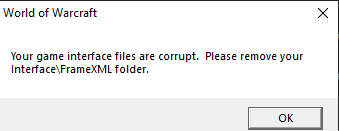
Image


4/30 12:53:03.601 ** Loading table of contents Interface\FrameXML\FrameXML.toc
4/30 12:53:03.601 Couldn't open Interface\FrameXML\Turtle_Barbershop\Turtle_BarbershopTemplates.xml
4/30 12:53:03.601 Couldn't open Interface\FrameXML\Turtle_Barbershop\Turtle_Barbershop.xml
4/30 12:53:03.601 ++ Loading file Interface\FrameXML\Turtle_TransmogUI\Turtle_TransmogUI.xml
4/30 12:53:03.601 Couldn't find inherited node: TransmogPlayerSlotSmall
4/30 12:53:03.601 ++ Loading file Interface\FrameXML\Turtle_ShopUI\Turtle_ShopUI.xml
4/30 12:53:03.601 Texture <unnamed>: Unable to load texture file Interface\ShopFrame\ShopFrame-Featured
4/30 12:53:03.601 ++ Loading file Interface\FrameXML\LFT\LFT.xml
4/30 12:53:03.601 SETALLPOINTS set to true in frame with anchors (ignored)

Asgun7777
Posts: 8

Re: Cant start game

Post#16 » Thu Apr 30, 2026 7:55 pm

anyone helpme? :D

User avatar
Darktifa
Posts: 81

Re: Cant start game

Post#17 » Thu Apr 30, 2026 8:02 pm

Asgun7777 wrote: Thu Apr 30, 2026 7:55 pm anyone helpme? :D
clean install and play
worked for me

Asgun7777
Posts: 8

Re: Cant start game

Post#18 » Thu Apr 30, 2026 8:55 pm

Darktifa wrote: Thu Apr 30, 2026 8:02 pm
Asgun7777 wrote: Thu Apr 30, 2026 7:55 pm anyone helpme? :D
clean install and play
worked for me
I did it 3 times, but it didn't help.

Antonerne
Posts: 12

Re: Cant start game

Post#19 » Fri May 01, 2026 6:35 am

Darktifa wrote: Thu Apr 30, 2026 8:02 pm
Asgun7777 wrote: Thu Apr 30, 2026 7:55 pm anyone helpme? :D
clean install and play
worked for me
i Just tried again with a fresh install and same problem
Attachments
Skärmbild 2026-05-01 080420.jpg
Skärmbild 2026-05-01 080420.jpg (7.82 KiB) Viewed 467 times

User avatar
Darktifa
Posts: 81

Re: Cant start game

Post#20 » Fri May 01, 2026 7:27 am

This is how i did it and worked for me

Download launcher
ALWAYS launch launcer as admin
Set a NEW folder for install location (on settings top right)
download the whole game 8+GB
update
play

unless they fix it with new launcher, forget about turtle installation

Who is online

Users browsing this forum: No registered users and 1 guest